BCBSMA MyBlue Member App
- 4.7
- Rating
- 100.00K
- Installs
- Free
- Price

 Analysis by App-foxy
Managing health insurance is rarely something I want to do for fun, but it becomes much less frustrating when I can check important details without searching through paperwork. That is the role I found for BCBSMA MyBlue Member App: it is a free medical app from BCBSMA for Blue Cross Blue Shield of Massachusetts members. I see it as a practical member-access tool rather than a general health tracker, symptom checker, or replacement for speaking with a doctor.
That distinction matters. The app is useful when the question is connected to my insurance membership, such as checking account information or handling a task that would otherwise require the member website or a phone call. It is not designed to diagnose an illness, monitor exercise, or organize every part of personal healthcare. If I were choosing it, I would do so because I have a BCBSMA membership and want a more convenient way to reach member services from a phone.
What the MyBlue experience is really for
My first impression is that the app makes most sense as a mobile doorway into an existing insurance relationship. The developer is BCBSMA, and the service is aimed specifically at members of Blue Cross Blue Shield of Massachusetts. That focus is helpful because it keeps the purpose clear: I am not opening it for broad medical information; I am opening it when an insurance-related task needs attention.
You May Also Like

 Blood Strike: 2.5 Anniversary
Blood Strike’s Loadouts Turn Every Drop Into a Tactical Gamble
A close look at Blood Strike’s custom loadouts: how fast access to signature weapons reshapes its battle royale rhythm, rewards preparation, and narrows the gap between fights.

 Pandora - Music & Podcasts
Pandora’s Music Is Easy to Start, but Harder to Recover
Pandora’s strength is its low-effort path from a seed to a station. Its weak spot is how much confidence it asks you to place in connection, setup, and quiet recovery.

 8 Ball Pool
 Is Built on Rivalries, Rematches, and Routine
A close look at the rivalries, rematches, shared routines, and unanswered safety questions that turn a quick pool match into a persistent mobile community.

 Samsung Music
’s Quiet Strength Is Playing What You Already Own
Its reach comes less from spectacle than from dependable access to a personal library. That simplicity is both the app’s strongest retention engine and its ceiling.

 AccuWeather: Weather Radar
AccuWeather Review: A Quick, Clear Forecast for Everyday Decisions
For everyday plans, the best forecast is the one you can understand quickly. AccuWeather makes rain timing, radar, and local conditions easy to act on, with a few trade-offs.

 Hill Climb Racing
Why Hill Climb Racing Still Turns Crashes Into One More Run
A tiny car, a bumpy hill and one more upgrade: Hill Climb Racing keeps resurfacing because its simple chaos makes every near-miss feel personal.
More From Our News Desk



The app has been available since June 26, 2015, and its current version is 7.41. Those details suggest an established member service rather than a newly launched experiment. It supports operating systems from version 7.1 onward, which is useful for people who keep an older phone for practical reasons. I would still check compatibility on the device I plan to use before relying on it for an urgent insurance task.
Its public reception is encouraging without being a reason to lower my guard. The app holds a 4.7 average from around 1.8 thousand ratings, with roughly 630 written reviews, and it has passed 100 thousand installs. Those figures tell me that other members are using it and that the broad experience is positive. They do not guarantee that every account, plan type, or device will behave identically, so I would judge it by whether it handles my own membership needs smoothly.
The age classification is Everyone, which fits a member-service app that can be used in an ordinary household. The free price is also appropriate: I would not expect to pay separately for access to a service connected to my insurance membership. Of course, free does not mean that every healthcare service becomes free, and I would never treat the app’s availability as proof that a visit, medicine, or procedure is covered.
Trust starts with the account boundary
My main trust question is simple: what am I using this app to do, and what should remain outside it? I would use it for my own BCBSMA member account, not as a shared family notebook or a place to store someone else’s medical history casually. Insurance information can be sensitive even when I am only checking a routine detail, so I would keep the phone protected with the device’s normal lock and avoid leaving an active session open on a shared device.
I also prefer to separate convenience from authority. If the app shows a member-related detail, I would use it to guide my next step, but I would still read the actual information carefully before making a medical or financial decision. A mobile screen is excellent for quick access, yet it can encourage fast tapping. For anything involving a treatment, a billing dispute, or a time-sensitive appointment, I would save the relevant details or confirm them through an official member-service channel.
That is one of the app’s important limits: an insurance app can help me reach information, but it cannot remove the need to understand that information. A displayed benefit detail is not the same as a guarantee that a particular provider, date, or service will be covered. I would contact BCBSMA when the wording is unclear rather than treating a convenient screen as a final medical or payment decision.
Controls I would check before relying on it
When I install a member app, I look for visible choices around signing in, staying signed in, and managing access. I want to know whether I can end a session when I finish, whether the app clearly distinguishes my account from other household members, and whether recovery instructions are easy to find if I forget how to sign in. These are not glamorous features, but they determine whether the app feels safe in daily use.
I would also review the phone’s app settings after installation. The operating system is the clearest place to see permissions that have been granted, and I prefer to allow only what is necessary for the way I intend to use the app. If a permission appears that I do not understand, I would pause and investigate it rather than accepting every prompt automatically. I would not infer that a permission is harmless simply because the app belongs to an insurer.
Another useful habit is to keep the app and the phone’s operating system maintained. The current app version is 7.41, but version numbers change, so I would use the official app store’s update controls rather than installing a file from an unfamiliar source. I would also avoid signing in over an unsecured public connection when I can wait for a trusted network. These steps are not special functions of MyBlue; they are sensible safeguards for any app that opens an insurance account.
If I were helping a family member use it, I would not save their password in a note or pass it around through messages. I would help them sign in on their own protected device and show them how to sign out or lock the phone. That small distinction gives the account holder more control and avoids turning convenience into accidental exposure.
Where privacy feels most important
The most sensitive moments are usually not the first launch or a quick visit to the home screen. They are the moments when I am reviewing information connected to care, payment, or another person on my plan. I would avoid opening the app while someone is looking over my shoulder, especially in a waiting room or on public transport. A phone notification or preview can reveal more than I intended, so I would review notification settings and limit lock-screen previews when privacy matters.
I would also be careful with screenshots. A screenshot of a member page may include identifying details that are easy to forget about later. If I need to send information to a provider or customer-service representative, I would share only the necessary part and remove the image afterward. For a billing question, writing down the relevant reference or describing the issue may be safer than forwarding a complete account screen.
Shared devices create a different risk. If I sign in on a tablet used by several people, I would treat that as a temporary arrangement and make sure the session is closed afterward. I would not rely on the app’s presence on the device as proof that my account is protected. The phone’s user profile, screen lock, and account habits are part of the overall security picture.
There is also a practical privacy trade-off in using an app instead of a browser. A dedicated app can feel quicker because it is already on my phone, but it also becomes a visible part of the device and may be easier to open accidentally. A browser session can be preferable when I am using a private computer that I control and do not share. On the other hand, a phone app is more convenient when I am away from home and need to check a member detail immediately.
How I would use it in an ordinary situation
Imagine that I am at a clinic and the office asks for insurance information before an appointment. I would open MyBlue rather than search through an old email or a photograph of a card. I would check the relevant member details, provide only what the office needs, and close the app when finished. If the office asks whether a specific service is covered, I would not guess from a general account screen. I would ask the insurer or the clinic to verify the exact service and provider circumstances.
That workflow shows the app’s real strength: it can reduce the friction between a question and the member account. It is especially useful when the alternative is carrying paper documents that may be outdated. It can also help me prepare before calling support, because I can review the information already associated with my membership instead of beginning the conversation without context.
A second use case is less urgent but equally valuable. Before scheduling care, I could review my available member information and make a short list of questions for the provider or BCBSMA. The app does not replace that conversation; it helps me arrive prepared. I find that approach safer than assuming a quick glance settles every coverage question.
For a family member, I would be more deliberate. I would first confirm whose account I am viewing and whether I am authorized to handle that person’s insurance matter. If the app does not make the needed distinction obvious, I would stop and use the member-service route rather than switching between profiles carelessly. Accuracy matters more than speed when several people share a plan.
Where it beats the usual alternatives
The traditional alternative is a browser or a phone call. Calling can be the better choice when I need a detailed explanation, have a complicated claim issue, or cannot interpret what I am seeing. A representative can ask follow-up questions in a way a static mobile screen cannot. The downside is the time and effort involved in waiting, explaining the situation, and possibly repeating information.
A browser is often better for careful reading or printing. On a larger screen, I can compare details, keep notes beside the page, and avoid the cramped layout that can make insurance language harder to follow. I would choose the browser when I need to review a long document or prepare records for a conversation.
The MyBlue app is strongest in the middle: faster than a call for a straightforward member task and more portable than a desktop browser. Its value is not that it makes insurance simple; it is that it puts the member relationship closer to the moment when I need it. That convenience is meaningful, but only when the task is simple enough to complete without interpretation.
I would skip it if I am not a BCBSMA member, because the app’s purpose is tied to that membership. I would also avoid making it my main tool if I need clinical advice, medication guidance, symptom evaluation, or a complete personal health record. A doctor, pharmacist, patient portal, or emergency service is more appropriate depending on the situation. The app should not be used to delay urgent care.
Small habits that make the experience safer
I would begin by signing in at home, while I have time to read each screen and confirm that the account belongs to me. I would not wait until I am standing at a reception desk to discover that I cannot access the account. After that first setup, I would check the phone’s notification behavior and decide whether member-related previews should appear when the screen is locked.
I would keep a clear separation between information I am viewing and information I am sharing. If a provider needs a member identifier, I would give that identifier rather than handing over my unlocked phone. If customer service needs context, I would describe the issue and confirm the recipient before sending anything. This is a more careful workflow than simply forwarding whatever appears on screen.
I would also use the app as a prompt for questions, not as a substitute for reading. When a term is unfamiliar, I would note it and ask BCBSMA or the provider to explain it. If the app’s information conflicts with a letter, a provider’s estimate, or another official communication, I would keep both records and request clarification. That approach prevents a small misunderstanding from becoming a larger billing problem.
Finally, I would review access after changing phones, sharing a device, or helping another person. Removing an old device from my routine, signing out where appropriate, and updating account recovery details are simple ways to preserve control. The app can be convenient, but account hygiene remains my responsibility.
My cautious recommendation
After looking at it as a member-access tool, I would recommend BCBSMA MyBlue Member App to people who are enrolled with Blue Cross Blue Shield of Massachusetts and want a convenient mobile route to their insurance account. Its free availability, established history, broad compatibility, and strong 4.7 average make it an easy app to try for ordinary member tasks. I especially like the idea of having account information available when I am away from my desk.
My recommendation comes with a clear boundary: I would use it for access and preparation, not for making assumptions about care or coverage. I would protect the phone, review permissions and notifications, avoid exposing screenshots, and contact BCBSMA when a detail has financial or medical consequences. Those habits matter more than the convenience of any single screen.
The best reason to install it is control over routine member tasks, not a promise that insurance decisions become effortless. If that is what I need, the app is a sensible companion to the browser and phone-support options. If I need clinical guidance, complex explanations, or a full record of my health, I would choose a more appropriate service instead.
FAQs for BCBSMA MyBlue Member App
01What features does the BCBSMA MyBlue Member App offer?
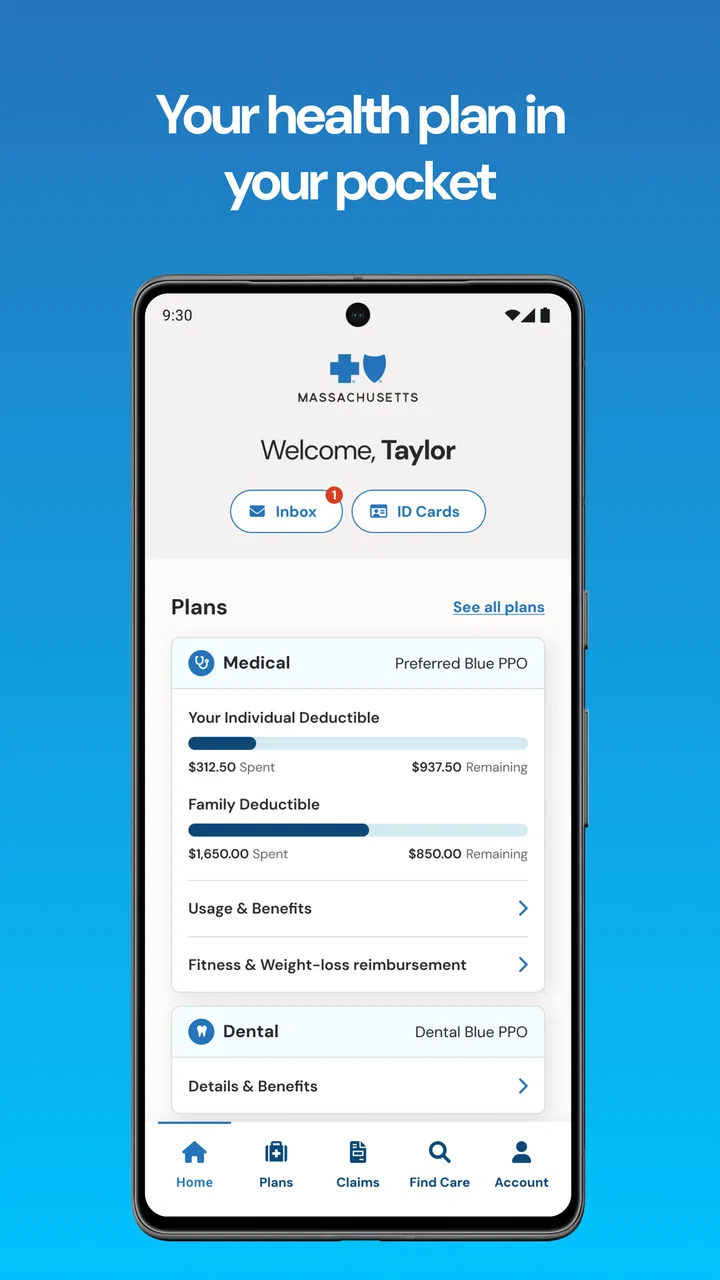
The BCBSMA MyBlue Member App provides a comprehensive suite of features including access to your health plan details, digital ID cards, claims tracking, and benefit information. It also offers a provider search tool to find doctors and facilities in your network, and health and wellness resources tailored to your plan.
02Is the BCBSMA MyBlue Member App available for both Android and iOS devices?
Yes, the BCBSMA MyBlue Member App is available for download on both Android and iOS platforms. You can find it on the Google Play Store for Android devices and the Apple App Store for iOS devices, ensuring accessibility across a wide range of smartphones and tablets.
03How does the app protect my personal and health information?
The BCBSMA MyBlue Member App uses robust security measures to protect your personal and health information. It incorporates encryption, secure login processes, and regular security updates to ensure your data remains confidential and secure. Always ensure you download the app from official app stores to avoid security risks.
04Can I use the app to manage my family’s health plans?
Yes, the app allows you to manage multiple health plans, making it easy for you to oversee your family's health coverage. You can access details for each family member, view claims, and manage appointments, providing a convenient way to keep track of everyone's health needs in one place.
05Are there any costs associated with using the BCBSMA MyBlue Member App?
The BCBSMA MyBlue Member App itself is free to download and use. However, standard data rates may apply depending on your mobile carrier and data plan. The app is designed to enhance your experience with BCBSMA services without additional charges for accessing its features.
Pros
- User-friendly interface
- Quick access to plan details
- Secure login process
- Easy doctor search
- 24/7 customer support
Cons
- Occasional login issues
- Limited customization options
- Notifications can be delayed
- Requires stable internet
- Some features need improvement

BCBSMA MyBlue Member App
Gallery